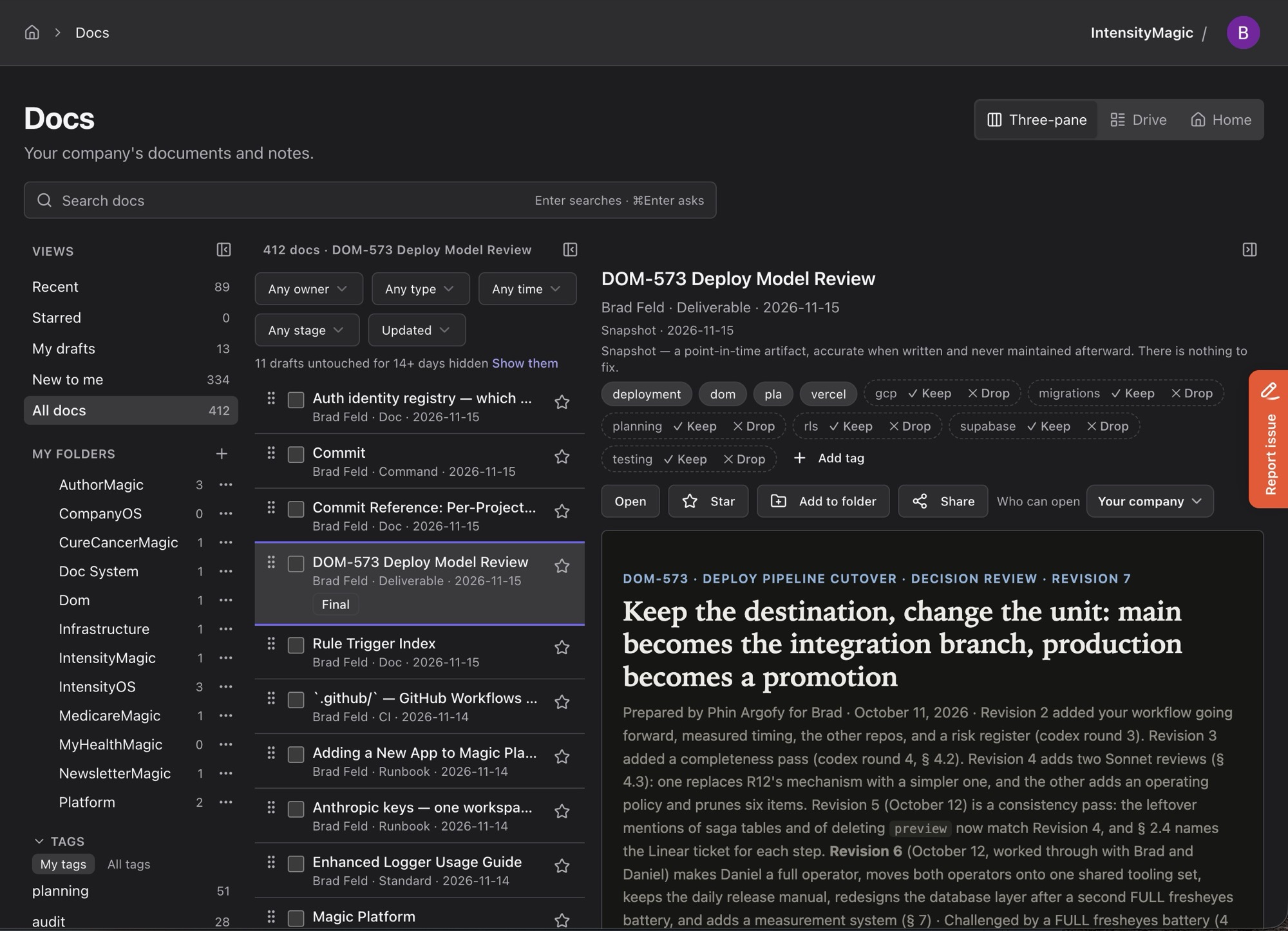
When I started doing more with Claude Code a year ago, I tried to do the obvious thing. I integrated it directly with Google and stored everything in Google Drive. That’s where my documents lived, and it’s where everyone I work with expected them to be. About six months ago, I got frustrated with the friction between Claude Code and Google Drive, especially as I tried to automate as much as I possibly could.
It didn’t work, so I rebuilt it. What I ended up with is Google Drive, rebuilt with GitHub as the storage layer. It works dramatically better than anything I try to do with Google Drive from Claude, especially at the command line.
For a search company, Google has made search in Google Drive suck badly. I don’t understand how this is possible, but it has been true for as long as I’ve used Drive.
Markdown is the native language of every LLM. Claude writes in it and hands it to you whether you asked for it or not. Google didn’t announce native Markdown support in Docs and Drive until October 5, 2026. Before that, you could only import and export, so every round trip was a conversion.
Markdown has been at the core of software development since 2004. Thank you, John Gruber , for creating it.
The Google CLI and MCP servers are getting better, but they are still limited and hard to work with. The Docs API hands back a document as a tree of elements, and edits are offsets into that tree. Claude can do it, but it fights the whole way. That’s why I started writing my own.
In my Doc System (which is what I’ve been calling this thing), every document starts in a private git repo on my laptop called docs-drafts. Every Claude turn that touches a file commits it automatically, so I never think about saving or versioning. I’ve created a block list that includes personal, health, and people documents. They get a never-publish marker the moment they’re created. The publisher refuses to touch them.
Documents are automatically published. The publisher runs gitleaks so a password doesn’t leak by accident. Then it makes one atomic commit straight to main in our docs repo on GitHub. There’s no branch and no pull request.
A push to that repo fires a webhook into IntensityOS, our internal company app, and the document shows up in the catalog within a minute. This is the part that looks like Drive. It has folders, tags that an AI job applies automatically, sharing by link or with people from my Google contacts, draft, final, and archived stages, version history, and a private area for documents only I can see. It even has a view called Drive.
The catalog also pulls in the docs that live in our other repos, like runbooks, standards, and command references.
Search combines full-text search with vector embeddings over every chunk of every document. There’s an Ask box where I type a question and get an answer with citations back to the documents it came from. Comments and suggestions work like they do in Google Docs. When someone accepts a suggestion or edits in the web editor, that change becomes a git commit.
Four things make this different from Drive.
The first is the agents. Fluffy, the agent on my laptop (if you’re asking what happened to Phin, that’s for another post), has its own identity in IntensityOS. It can search the docs, read comments, reply, suggest edits, close threads, and publish drafts.
When people comment on one of my documents, I type /co-pushdoc revise and the document’s name. Fluffy reads the open threads and makes the changes that are clear. It asks me about the ones that aren’t, republishes, and then replies to and closes each thread. The thread records that Fluffy closed it. When I close one, it records me.
The second is that the documents live in git. Every version of every published document is a commit on a protected branch that nobody can rewrite. IntensityOS ties each document it shows to the exact git version it came from.
The third is the format. The files are HTML and Markdown, which is what Claude already writes. There is no conversion step and no proprietary format to fight.
The fourth is the command line. Claude knows git and gh cold, so it doesn’t need a special API to read a document or see what changed. The web app is for the humans.
And, for maximum irony, the publisher can send documents to a Google Drive folder. A company that wants its documents in Drive gets each one as a PDF and a Google Doc. Drive works fine as an output. It just doesn’t work as the place where the work happens.
There’s plenty of good open source in this neighborhood. None of it does quite this.
Wiki.js has a git storage module, but its database is primary. It syncs to git on a timer, five minutes by default, under a single committer.
Gollum is a git-backed Markdown wiki, the same idea behind GitHub and GitLab wikis. It’s a wiki, so it has no comments, suggestions, sharing, or review workflow.
Outline and Docmost are excellent Notion-style editors that keep everything in Postgres. Outline uses the Business Source License, which isn’t OSI open source. Docmost is AGPL.
Nextcloud replaces Drive as file sync. It stops at files.
Obsidian with a git plugin is the closest in spirit for a single person. It stops working the moment someone else needs to comment on your document.
What I couldn’t find was the combination: git as the home for the documents, a real collaboration layer on top of it, and agents that participate under their own names.
I can’t decide whether to open source it.
Part of me wants to.
The code is the easy part. The problem is me. I’ve never been an open source maintainer, and I know what the job involves: issues, pull requests, security reports, people who need help getting it running, and the steady obligation to respond to all of it.
I don’t want that personal overhead, and as a first-timer I’d probably be bad at it.
If you’d use something like this, or you’ve figured out how to open source a project without it eating your life, I’d like to hear from you.
It’s kind of wild that it’s now easier to recreate these apps than to get them integrated.
Look for more soon. I’ve also completely replaced Google Docs for all my writing, which is where AuthorMagic and Zero Knowledge , the novel I’m writing in public, come in.